对于一些支持推理模型的LLM(如DeepSeekR1 带有推理解析器的vLLM),除了LLM的直接返回结果,推理结果往往也是一个非常有用的返回信息,对于SpringAI,我们可以通过从返回的 Metadata 中获取推理结果。
使用推理的前提是模型必须支持推理,我们可以使用阿里的 qwen-plus-latest 或者智谱的 glm-4.5-flash;这两个都是支持推理过程的模型。
一、实例演示
首先我们需要创建一个SpringAI的项目,基本流程同 创建一个SpringAI-Demo工程
1. 初始化
我们借助OpenAI的接口风格来解析推理过程,因此需要引入对应的依赖:
1
2
3
4
5
6
7
8
9
10
| <dependencies>
<dependency>
<groupId>org.springframework.boot</groupId>
<artifactId>spring-boot-starter-web</artifactId>
</dependency>
<dependency>
<groupId>org.springframework.ai</groupId>
<artifactId>spring-ai-starter-model-openai</artifactId>
</dependency>
</dependencies>
|
然后创建一个 Controller 用于测试
1
2
3
4
5
6
7
8
9
10
11
12
13
14
15
16
17
18
19
20
21
22
23
24
25
26
27
28
29
30
31
32
33
34
35
36
37
38
39
40
41
42
43
44
45
46
47
48
49
50
51
52
53
| @RestController
public class ChatController {
private final ChatModel dashModel;
private final ChatModel zhipuModel;
public ChatController(Environment environment) {
OpenAiApi openAiApi = OpenAiApi.builder().apiKey(getApiKey(environment, "dash-api-key"))
.baseUrl("https://dashscope.aliyuncs.com/compatible-mode")
.completionsPath("/v1/chat/completions")
.build();
dashModel = OpenAiChatModel.builder()
.openAiApi(openAiApi)
.defaultOptions(OpenAiChatOptions.builder()
.model("qwen-plus-latest")
.extraBody(Map.of("enable_thinking", true))
.build())
.build();
OpenAiApi zhipuApi = OpenAiApi.builder().apiKey(getApiKey(environment, "zhipuai-api-key"))
.baseUrl("https://open.bigmodel.cn")
.completionsPath("/api/paas/v4/chat/completions")
.build();
zhipuModel = OpenAiChatModel.builder()
.openAiApi(zhipuApi)
.defaultOptions(OpenAiChatOptions.builder().model("glm-4.5-flash")
.build())
.build();
}
private String getApiKey(Environment environment, String key) {
String val = environment.getProperty(key);
if (StringUtils.isBlank(val)) {
val = System.getProperty(key);
if (val == null) {
val = System.getenv(key);
}
}
return val;
}
}
|
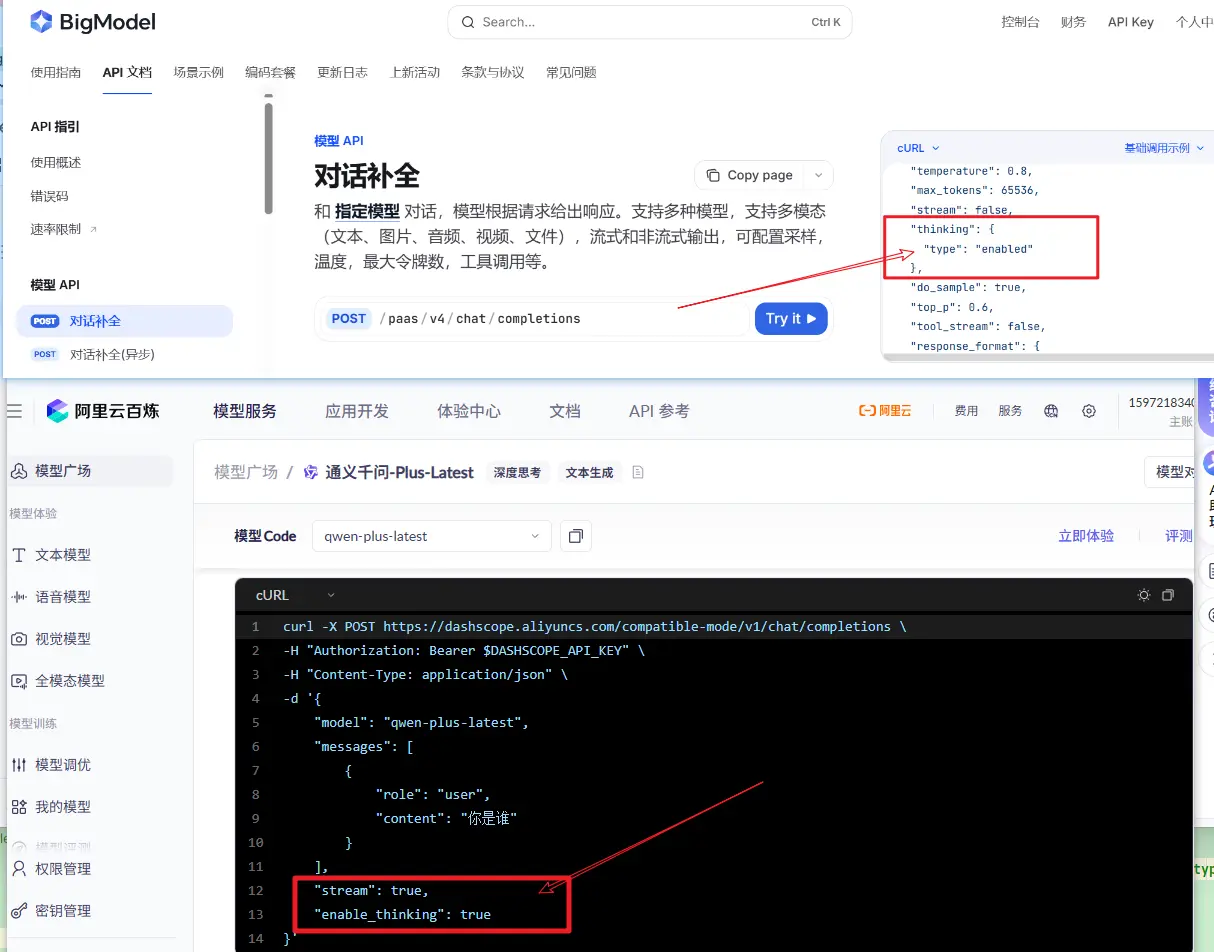
注意上面的实现,我们基于 OpenAiApi 来创建 ChatModel,在创建创建ChatModel时,通过 extraBody 来传递额外参数,告诉大模型是否开启推理过程
但是请注意,这个推理是否开启的参数依然是取决于具体的模型提供商的要求
- 阿里的百炼模型,推理参数为
enable_thinking,且必须显示传递 .extraBody(Map.of("enable_thinking", true))
- 智谱的glm-4.5-flash模型,默认就是开启推理的,不需要额外传递参数;如果希望关闭,可以设置参数
.extraBody(Map.of("thinking", Map.of("type", "disabled")))
2. 获取推理结果
我们先使用同步调用智谱模型,看看表现
1
2
3
4
5
6
7
8
9
10
11
12
13
14
| @GetMapping(path = "zhipuChatV2")
public Map zhipuChatV2(String msg) {
ChatClient client = ChatClient.builder(zhipuModel)
.defaultAdvisors(new SimpleLoggerAdvisor())
.build();
ChatResponse response = client.prompt(new Prompt(msg)).call().chatResponse();
var reason = response.getResult().getOutput().getMetadata().get("reasoningContent");
var content = response.getResult().getOutput().getText();
var usage = response.getMetadata().getUsage();
return Map.of("思考过程", reason == null ? "" : reason, "结果", content, "token消耗", usage);
}
|
测试一下,结果返现并没有推理过程;主要原因是推理过程需要是stream()方式调用,然后由用户在 delta 中进行获取
我们在改成 .stream() 方法来获取推理结果
获取推理结果的关键代码在: generation.getOutput().getMetadata().get("reasoningContent");
1
2
3
4
5
6
7
8
9
10
11
12
13
14
15
16
17
18
19
20
21
22
23
24
25
26
27
28
29
30
31
32
33
|
@GetMapping(path = "zhipuChat")
public Map zhipuChat(String msg) {
ChatClient client = ChatClient.builder(zhipuModel).defaultAdvisors(new SimpleLoggerAdvisor()).build();
Flux<ChatResponse> res = client.prompt(new Prompt(msg)).stream().chatResponse();
StringBuilder content = new StringBuilder();
StringBuilder reason = new StringBuilder();
ChatResponse response = res.doOnComplete(() -> {
System.out.println("思考过程:" + reason);
System.out.println("结果:" + content);
}).doOnNext(txt -> {
Generation generation = txt.getResult();
var r = generation.getOutput().getMetadata().get("reasoningContent");
if (r != null) {
reason.append(r);
System.out.println("思考:" + r);
}
var t = generation.getOutput().getText();
if (t != null) {
content.append(t);
System.out.println("结果:" + t);
}
}).blockLast();
var usage = response.getMetadata().getUsage();
return Map.of("思考过程", reason, "结果", content, "token消耗", usage);
}
|
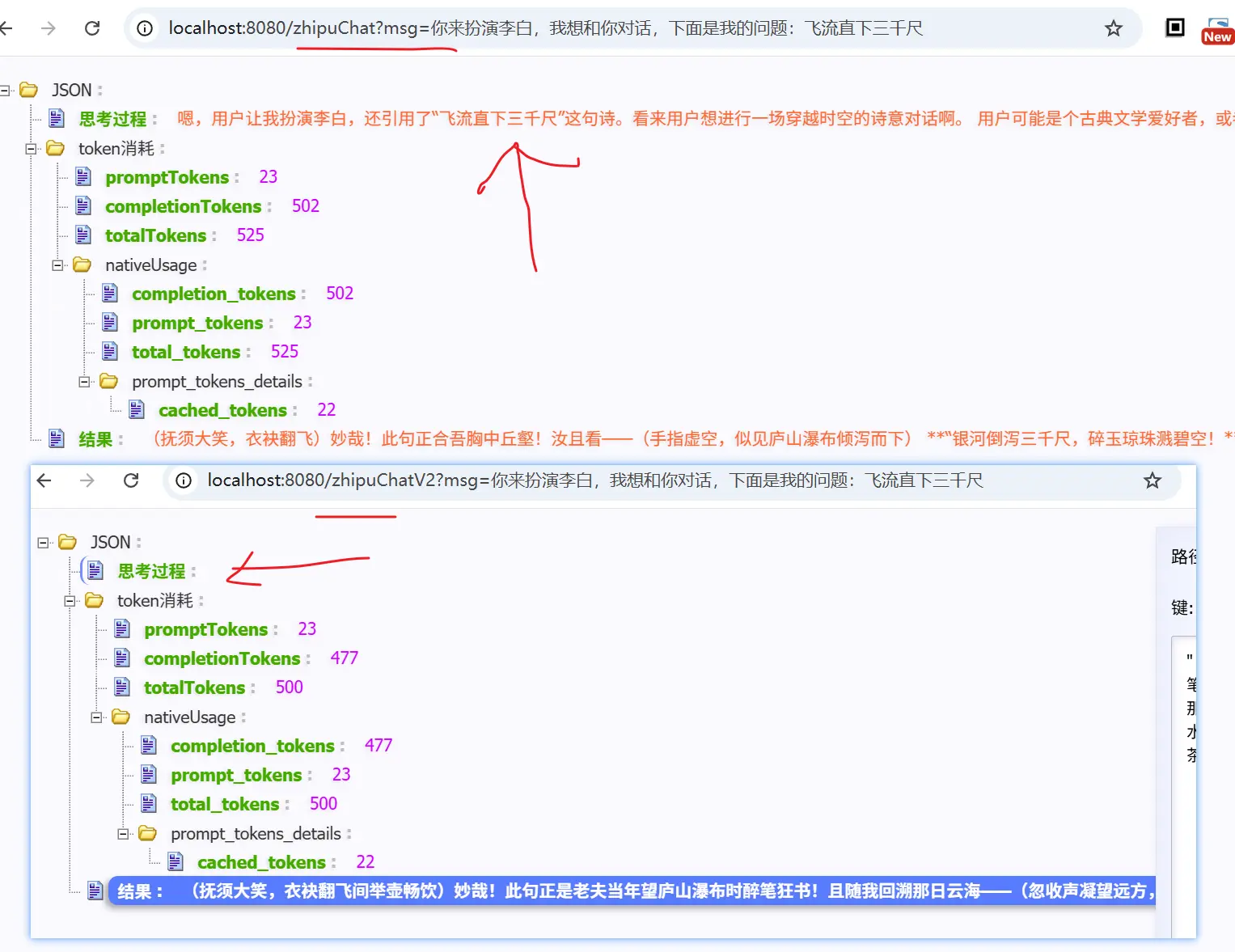
从上面的结果也可以看出,对于推理过程,使用流式调用,然后再metadata中获取
上面是智谱的大模型;阿里百炼的模型,获取推理结果同样也是使用流式调用,区别在于,若开启了推理过程,那么必须使用流式调用;否则,会报错
二、小结
本文介绍了如何与支持推理的LLM进行交互,并获取推理过程;从使用层面来看并没有太多的差异,只是需要注意
- 推理过程需要使用流式调用
- 根据模型的传参定义,判断是否需要主动设置参数,以开启推理过程
- 从返回的
metadata中,获取 reasoningContent 来获取推理过程
1. 微信公众号: 一灰灰Blog
尽信书则不如,以上内容,纯属一家之言,因个人能力有限,难免有疏漏和错误之处,如发现bug或者有更好的建议,欢迎批评指正,不吝感激
下面一灰灰的个人博客,记录所有学习和工作中的博文,欢迎大家前去逛逛

打赏
如果觉得我的文章对您有帮助,请随意打赏。

微信打赏

支付宝打赏