之前介绍的多轮对话,上下文存储主要是SpringAI提供的能力支持;接下来我们看一下,在agent开发时推荐使用的框架LangGraphJ,如何实现多轮对话
一、LangGraphJ实现多轮对话
1. 创建项目
创建一个SpringAI项目,基本流程同 创建一个SpringAI-Demo工程
2. 添加依赖
在pom.xml中添加关键依赖
1
2
3
4
5
6
7
8
9
10
11
12
13
14
15
16
17
18
19
| <properties>
<langgraph4j.version>1.6.0-rc4</langgraph4j.version>
</properties>
<dependencies>
<dependency>
<groupId>org.bsc.langgraph4j</groupId>
<artifactId>langgraph4j-springai-agentexecutor</artifactId>
<version>${langgraph4j.version}</version>
</dependency>
<dependency>
<groupId>org.springframework.boot</groupId>
<artifactId>spring-boot-starter-web</artifactId>
</dependency>
<dependency>
<groupId>org.springframework.ai</groupId>
<artifactId>spring-ai-starter-model-zhipuai</artifactId>
</dependency>
</dependencies>
|
我们这里直接依赖的是 langgraph4j-springai-agentexecutor 模块,该模块提供了基于SpringAI的AgentExecutor实现;使用的版本为当前(25/08/08)的最新版本,有需要的小伙伴根据实际情况进行调整
3. 配置
在配置文件 application.yml 文件中,添加大模型配置,我们这里依然是使用ZhipuAI的模型进行演示
1
2
3
4
5
6
7
8
9
10
11
12
13
| spring:
ai:
zhipuai:
api-key: ${zhipuai-api-key}
chat:
options:
model: GLM-4-Flash
logging:
level:
org.springframework.ai.chat.client.advisor.SimpleLoggerAdvisor: debug
|
4. MemAgent实现
实现一个MemAgent,用于获取对话的CompileGraph
1
2
3
4
5
6
7
8
9
10
11
12
13
14
15
16
17
18
| public class MemAgent {
private final StateGraph<AgentExecutor.State> graph;
private final CompiledGraph<AgentExecutor.State> workflow;
public MemAgent(ChatModel model) throws GraphStateException {
this(model, new MemorySaver());
}
public MemAgent(ChatModel model, BaseCheckpointSaver memorySaver) throws GraphStateException {
this.graph = AgentExecutor.builder().chatModel(model).build();
this.workflow = graph.compile(CompileConfig.builder().checkpointSaver(memorySaver).build());
}
public CompiledGraph<AgentExecutor.State> workflow() {
return workflow;
}
}
|
注意上面的实现, MemorySaver 是一个 BaseCheckpointSaver 的实现,用于实现 Checkpoint 的保存,对话历史保存到jvm内存中;使用org.bsc.langgraph4j.RunnableConfig.threadId来实现不同身份的会话隔离
5. 多轮对话端点
提供一个聊天接口,第一个参数为用户标识,用于区分用户的聊天记录
1
2
3
4
5
6
7
8
9
10
11
12
13
14
15
16
17
18
19
20
21
22
23
24
25
26
| @RestController
public class ChatController {
private final CompiledGraph<AgentExecutor.State> workflow;
public ChatController(ChatModel chatModel) throws GraphStateException {
this.workflow = new MemAgent(chatModel).workflow();
}
@GetMapping("/{user}/chat")
public Object chat(@PathVariable String user, String msg) {
var runnableConfig = RunnableConfig.builder().threadId(user).build();
var state = workflow.invoke(Map.of("messages", new UserMessage(msg)), runnableConfig).orElseThrow();
return state.lastMessage().map((Content::getText)).orElse("No Response");
}
}
|
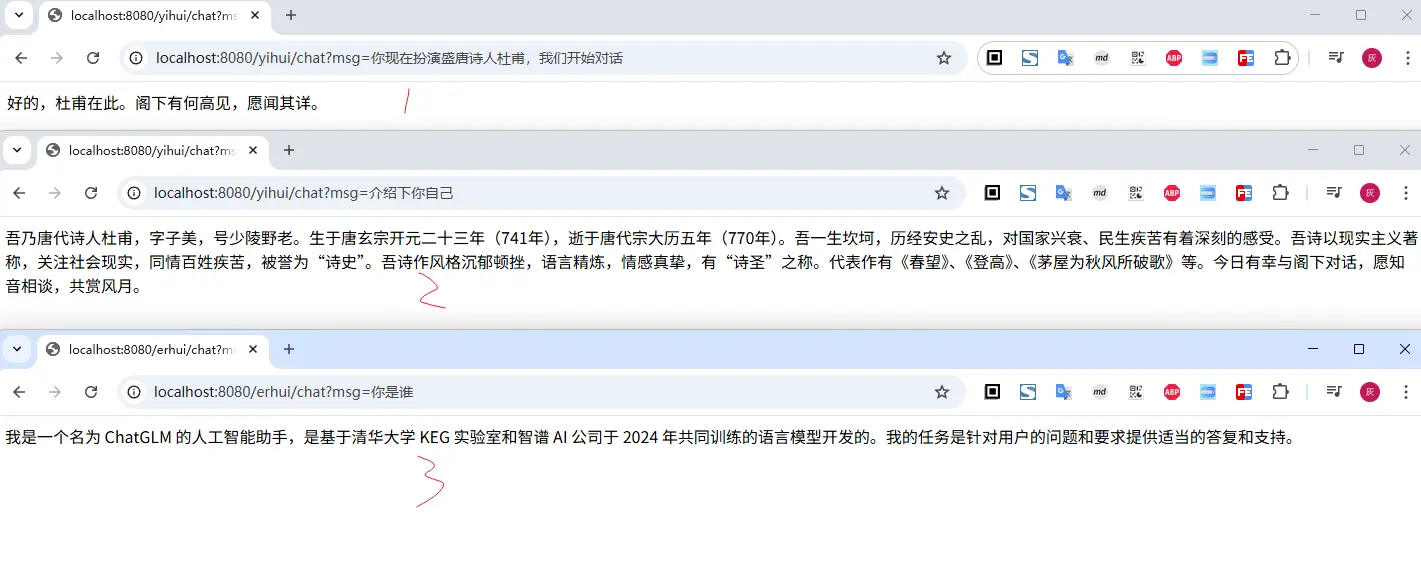
二、小结
本文演示了通过 LangGraphJ 实现多轮对话的实现,虽然效果是实现了,但是对LangGraphJ不太了解的小伙伴,估计会有很多疑问,这个框架是怎么工作的呢?又该如何使用它来开发Agent呢?
文中所有涉及到的代码,可以到项目中获取 https://github.com/liuyueyi/spring-ai-demo
微信公众号: 一灰灰Blog
尽信书则不如,以上内容,纯属一家之言,因个人能力有限,难免有疏漏和错误之处,如发现bug或者有更好的建议,欢迎批评指正,不吝感激
下面一灰灰的个人博客,记录所有学习和工作中的博文,欢迎大家前去逛逛
打赏
如果觉得我的文章对您有帮助,请随意打赏。
微信打赏

支付宝打赏