SpringAI中,ChatModel作为与大模型交互的具体实现,更上一层的应用推荐则是使用ChatClient,特别是在结构化输出、多轮对话的场景,ChatClient提供了更方便的调用方式
如结构化输出,两者的写法对比如下
1 2 3 4 5 6 7 8 9 10 11 12 13 14 15 16 17 18 19 20 21 BeanOutputConverter<ActorsFilms> beanOutputConverter = new BeanOutputConverter <>(ActorsFilms.class); String format = beanOutputConverter.getFormat();PromptTemplate template = new PromptTemplate (""" 帮我返回五个{actor}导演的电影名 {format} """ );Prompt prompt = template.create(Map.of("actor" , actor, "format" , format));Generation generation = chatModel.call(prompt).getResult();if (generation == null ) {return null ;} return beanOutputConverter.convert(generation.getOutput().getText());PromptTemplate template = new PromptTemplate ("帮我返回五个{actor}导演的电影名,要求中文返回" );Prompt prompt = template.create(Map.of("actor" , actor));ActorsFilms films = ChatClient.create(chatModel).prompt(prompt).call().entity(ActorsFilms.class);
一、基本使用 1. 创建ChatClient 使用自动配置的ChatClient.Builder
如果你的项目中,只有一个大模型使用,且使用的是官方提供的starter进行的接入,那么你可以直接使用SpringBoot自动装配的ChatClient.Builder来创建ChatClient
如下
1
2
3
4
5
6
7
8
@RestController public class ChatController { private final ChatClient chatClient; public ChatController (ChatClient.Builder builder) { chatClient = builder.build(); } }
但是,请注意,当一个应用中需要使用多个聊天模型时,则不能使用上面这种方式了,因为很难知道底层到底用的是哪个模型,此时则建议使用ChatModel进行创建
使用ChatModel创建ChatClient
1
2
3
4
5
6
7
8
@RestController public class ChatController { private final ChatClient chatClient; public ChatController (ChatModel chatModel) { chatClient = ChatClient.builder(chatModel).build(); } }
2. OpenAI兼容API的客户端初始化方式 借助 OpenAiApi 与 OpenAiChatModel 类提供的 mutate() 方法,来实现兼容OpenAI API 的调用
1
2
3
4
5
6
7
8
9
10
11
12
13
14
15
16
17
18
19
20
21
22
23
24
25
26
@Service public class MultiModelService { private static final Logger logger = LoggerFactory.getLogger(MultiModelService.class); private ChatClient groqClient; public MultiModelService (OpenAiChatModel baseChatModel, OpenAiApi baseOpenAiApi) { try { OpenAiApi groqApi = baseOpenAiApi.mutate() .baseUrl("https://api.groq.com/openai" ) .apiKey(System.getenv("GROQ_API_KEY" )) .build(); OpenAiChatModel groqModel = baseChatModel.mutate() .openAiApi(groqApi) .defaultOptions(OpenAiChatOptions.builder().model("llama3-70b-8192" ).temperature(0.5 ).build()) .build(); groqClient = ChatClient.builder(groqModel).build(); } catch (Exception e) { } } }
3. 提示词传入 创建ChatClient时,需要传入的Prompt对象用于和大模型进行交互,提供了三种方式
直接接收String
1 chatClient.prompt("为我写首诗" ).call().content();
这种表示传入的文本,作为用户消息传送给大模型
接收Prompt对象
直接接收Prompt对象,具体的交互信息封装在Prompt对象中,由用户来管控
1 chatClient.prompt(new Prompt (new UserMessage ("为我写首诗" ))).call().content();
Fluent式
通过无参方式启动FluentAPI,支持逐步构建系统消息、用户消息提示词
1
2
3
4
chatClient.prompt() .system("你现在扮演盛唐著名的诗人李白,接下来我们进行对话" ) .user("为我写首诗" ) .call().content();
4. 响应 AI 模型返回的 ChatResponse 对象,封装了模型返回的 Generation 对象,以及一些元数据、token统计
1
2
3
4
ChatResponse response = chatClient.prompt() .system("你现在扮演盛唐著名的诗人李白,接下来我们进行对话" ) .user("为我写首诗" ) .call().chatResponse();
如我们希望获取用户的token情况,则可以在元数据中获取
1 Usage usage = response.getMetadata().getUsage();
获取返回的消息
1 2 3 Generation generation = response.getResult();
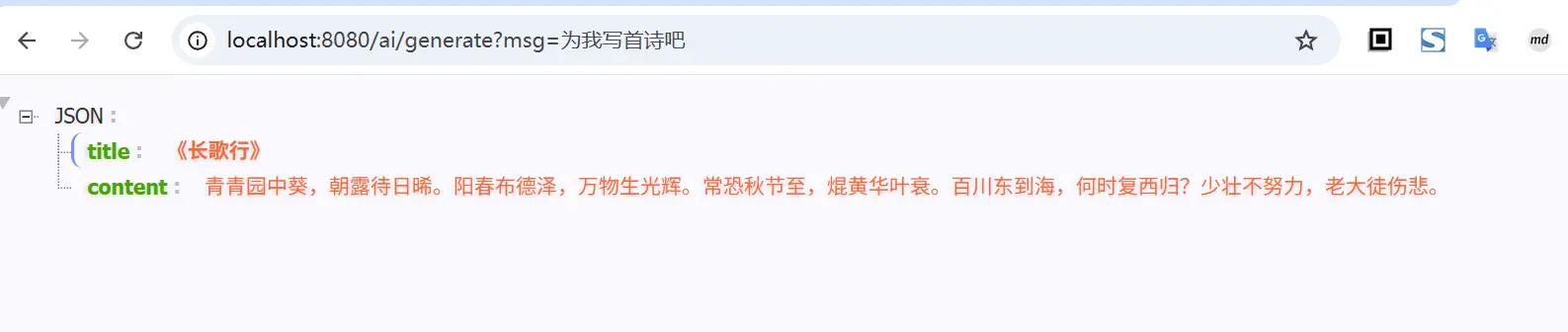
结构化输出,如需将返回的String映射为实体类,则可以考虑使用 entity() 来实现
1
2
3
4
5
6
7
8
9
10
11
@GetMapping("/ai/generate") public Object generate (@RequestParam(value = "msg", defaultValue = "你好") String msg) { Poem poem = chatClient.prompt() .system("你现在扮演盛唐著名的诗人李白,接下来我们进行对话" ) .user(msg) .call().entity(Poem.class); return poem; } record Poem (String title, String content) {}
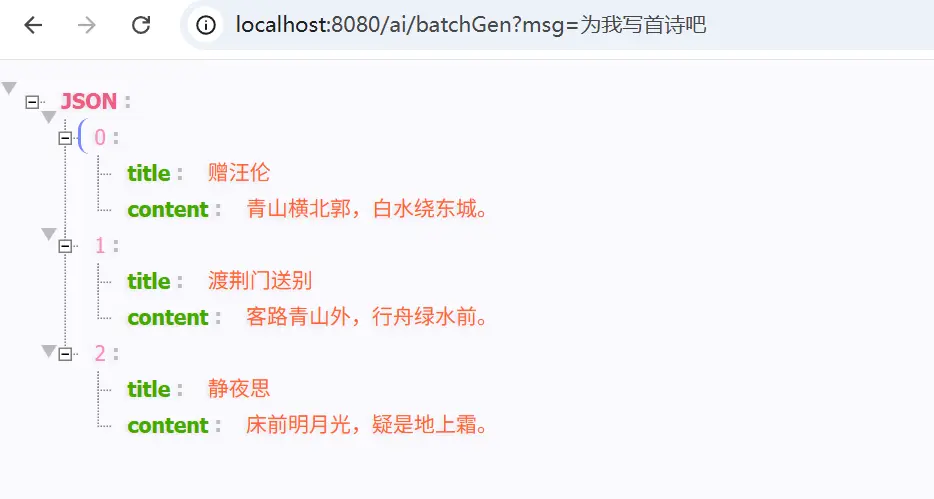
当然,前面介绍的结构化输出时,也提到了可以借助 ParameterizedTypeReference 来实现泛型等复杂类型的指定,如
1
2
3
4
5
6
7
8
@GetMapping("/ai/batchGen") public Object batchGen (@RequestParam(value = "msg", defaultValue = "你好") String msg) { List<Poem> poem = chatClient.prompt() .system("你现在扮演盛唐著名的诗人李白,接下来我们进行对话" ) .user(msg) .call().entity(new ParameterizedTypeReference <List<Poem>>() {}); return poem; }
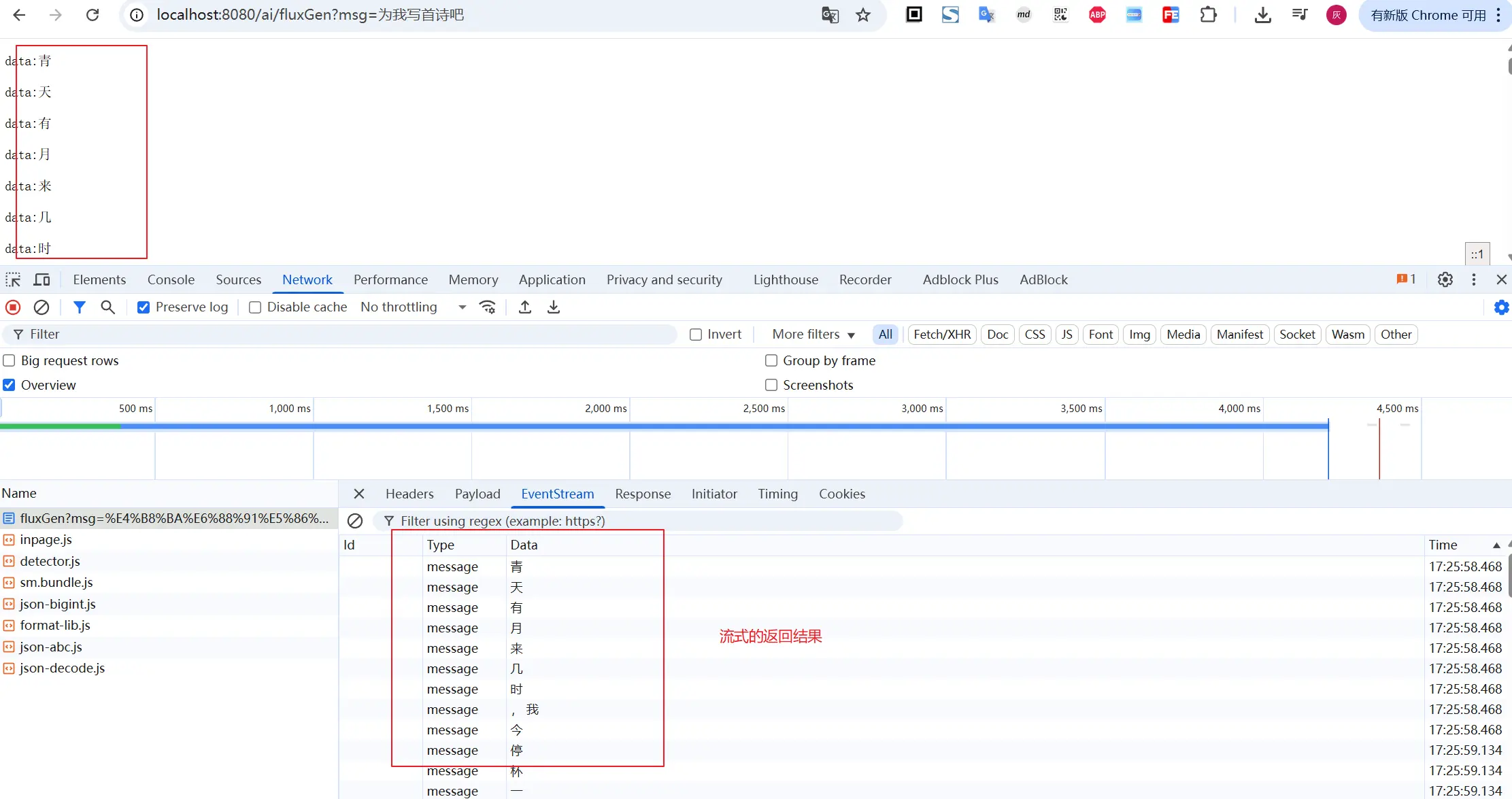
5. 流式调用 流式调用,前面介绍的通过call方法实现同步请求大模型,等待模型返回结果,然后进行结果处理。我们平时使用大模型时,更常见的是流式的交互方式,问一个问题,对方一点一点的返回结果
对于ChtClient而言,要想实现流式调用,则需要借助stream()方法,如
1
2
3
4
5
6
@GetMapping(path = "/ai/fluxGen", produces = "text/event-stream") public Flux<String> fluxGen (@RequestParam(value = "msg", defaultValue = "你好") String msg) { return chatClient.prompt() .system("你现在扮演盛唐著名的诗人李白,接下来我们进行对话" ) .user(msg).stream().content(); }
访问示例如下:
二、进阶使用 1. 提示词模板 ChatClient Fluent 式 API 支持提供含变量的用户/系统消息模板,运行时进行替换。
1
2
3
4
5
6
7
8
9
@GetMapping("/ai/template") public String template (@RequestParam(value = "role", defaultValue = "李白") String role, @RequestParam(value = "msg", defaultValue = "你好") String msg) { return chatClient.prompt() .system(u -> u.text("你现在扮演盛唐著名的诗人{role},接下来我们进行对话" ) .param("role" , role)) .user(u -> u.text("我是一个现代诗歌爱好者,我的提问是:{msg}" ).params(Map.of("msg" , msg))) .call().content(); }
默认使用的是 {} 的模板变量替换,当然如果你有诉求,想用 <> 进行替换(如提示词中包含json时,{}的方式可能不太适合了),可以如下进行调整
1
2
3
4
5
6
7
8
9
10
@GetMapping("/ai/template") public String template (@RequestParam(value = "role", defaultValue = "李白") String role, @RequestParam(value = "msg", defaultValue = "你好") String msg) { return chatClient.prompt() .system(u -> u.text("你现在扮演盛唐著名的诗人{role},接下来我们进行对话" ) .param("role" , role)) .user(u -> u.text("我是一个现代诗歌爱好者,我的提问是:<msg>" ).params(Map.of("msg" , msg))) .templateRenderer(StTemplateRenderer.builder().startDelimiterToken('<' ).endDelimiterToken('>' ).build()) .call().content(); }
2. stream结构化返回 使用 call() 同步调用时,结构化输出比较简单,直接通过 entity() 方法传入对象类型即可;对于流式的场景,由于大模型是逐步返回的,没有获取到完整的内容直接转换为目标对象,基本就是序列化异常了
对于 stream 方式,需要接过话输出时,可以考虑使用下面的方式
1
2
3
4
5
6
7
8
9
10
11
12
13
14
15
public class ChatController { @GetMapping(path = "/ai/fluxGenV2") public List<Poem> fluxGenV2 (@RequestParam(value = "msg", defaultValue = "你好") String msg) { var converter = new BeanOutputConverter <>(new ParameterizedTypeReference <List<Poem>>() { }); Flux<String> flux = chatClient.prompt() .system("你现在扮演盛唐著名的诗人李白,接下来我们进行对话" ) .user(u -> u.text("{msg}.\n{format}" ).param("msg" , msg).param("format" , converter.getFormat())) .stream().content(); String content = flux.collectList().block().stream().collect(Collectors.joining()); return converter.convert(content); } }
3. 默认值 我们可以在ChatClient创建时,使用一些默认的系统消息、提示词设置(通过 defaultXxx 的方式)
如下面给出了提供默认的消息提示词(支持带参数) 和默认的模型参数设置
说明:默认的配置,可以通过不带 default 前缀的相同方法进行覆盖
1
2
3
4
5
6
7
8
9
10
11
12
13
14
15
16
17
18
19
20
21
22
23
24
25
26
27
28
29
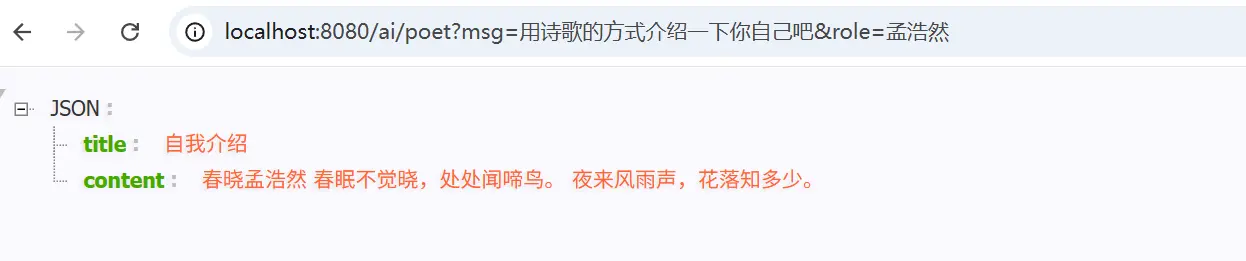
@RestController public class ChatController { private static final org.slf4j.Logger log = org.slf4j.LoggerFactory.getLogger(ChatController.class); private final ChatClient chatClient; private final ChatClient poemClient; public ChatController (ChatModel chatModel) { chatClient = ChatClient.builder(chatModel).build(); poemClient = ChatClient.builder(chatModel) .defaultSystem("你现在扮演著名的诗人{role},接下来我们进行对话" ) .defaultOptions(ChatOptions.builder().maxTokens(500 ).build()) .build(); } @GetMapping("/ai/poet") public Poem poetChat (String role, String msg) { return poemClient.prompt().system(sp -> sp.param("role" , role)) .user(msg) .call().entity(Poem.class); } record Poem (String title, String content) { } }
4. Advisor Advisor API 为 Spring 应用中的 AI 驱动交互提供灵活强大的拦截、修改和增强能力。这个思路基本和AOP 类似,但是 Advisor 允许在运行时动态修改方法调用,从而实现更灵活的逻辑处理。
如我们希望在用户消息基础上追加或增强上下文数据时
可以是RAG技术给大模型喂资料
也可以是集成聊天历史,实现多轮对话
比如之前在介绍聊天上下文时,提到的借助MessageChatMemoryAdvisor来实现多轮对话
1
2
3
4
5
6
7
8
9
10
11
@Autowired private ChatMemory chatMemory;@GetMapping("/ai/historyChat") public String historyChat (String msg) { return chatClient.prompt() .system("你现在扮演盛唐著名诗人李白,我们接下来开启对话" ) .user(msg) .advisors(MessageChatMemoryAdvisor.builder(chatMemory).build()) .call().content(); }
除了上面这个之外,另外一个记录ChatClient请求和返回的 SimpleLoggerAdvisor 也是常用的增强
1
2
3
4
5
6
7
8
@GetMapping("/ai/historyChat") public String historyChat (String msg) { return chatClient.prompt() .system("你现在扮演盛唐著名诗人李白,我们接下来开启对话" ) .user(msg) .advisors(new SimpleLoggerAdvisor (), MessageChatMemoryAdvisor.builder(chatMemory).build()) .call().content(); }
要查看日志,需要调整 advisor 包的日志级别设为 DEBUG,如下设置即可
1 logging.level.org.springframework.ai.chat.client.advisor =DEBUG
如果觉得默认的输出不合心意,也可以在创建时,指定传参、返回的打印方式,如
1
2
3
4
5
6
7
8
9
10
11
12
@GetMapping("/ai/historyChat") public String historyChat (String msg) { return chatClient.prompt() .system("你现在扮演盛唐著名诗人李白,我们接下来开启对话" ) .user(msg) .advisors(new SimpleLoggerAdvisor ( req -> ("[request] " + req), res -> ("[response] " + res), 0 ), MessageChatMemoryAdvisor.builder(chatMemory).build()) .call().content(); }
请注意,当传入多个 advisor 时,传入的顺序很重要,决定了它们的执行顺序。每个 Advisor 都会以某种方式修改提示词或上下文,且一个 Advisor 所做的更改会传递给链中的下一个 Advisor。
三、小结 本文的内容主要是相对成体系的介绍了一下前面几篇文章示例中的 ChatClient 的使用方式,同时也将前面的内容或多或少都覆盖了一部分。 通常来讲,我们与大模型之间的交互,更推荐的是基于ChatClient来实现,SpringAI对其上层使用,封装的很是齐全了,有兴趣的小伙伴可以赶紧体验一下
文中所有涉及到的代码,可以到项目中获取 https://github.com/liuyueyi/spring-ai-demo
微信公众号: 一灰灰Blog 尽信书则不如,以上内容,纯属一家之言,因个人能力有限,难免有疏漏和错误之处,如发现bug或者有更好的建议,欢迎批评指正,不吝感激
下面一灰灰的个人博客,记录所有学习和工作中的博文,欢迎大家前去逛逛
打赏
如果觉得我的文章对您有帮助,请随意打赏。
微信打赏
支付宝打赏