【AI基础系列】 工具调用 FunctionCalling

文章目录
  1. 一、工作原理
    1. 1. 工具调用流程
    2. 2. SpringAI关键实现
      1. a. ToolCallback
      2. b. ToolDefinition
      3. c. JSON Schema
      4. d. 结果转换
      5. e. ToolContext
  2. 二、使用示例
    1. 1. 项目创建
    2. 2. 声明式使用方式
    3. 3. 带参数的工具方法
    4. 4. 添加默认工具
    5. 5. ChatModel 添加工具
    6. 6. 编程式使用方式
    7. 7. 函数作为工具调用的使用示例
    8. 8. 动态范式 @Bean
  3. 三、小结
    1. 微信公众号: 一灰灰Blog

我们知道大模型是基于一系列数据进行训练的,且每次训练的成本很高;那么大模型是怎么样表现得十八般武艺样样精通的呢?

function calling就是设计出来给大模型当外挂的瑞士工具包,通过给大模型设计一个与外部工具进行交互的方式,来扩展大模型在训练时缺失或者不够与时俱进的能力

一、工作原理

SpringAi 提供了完备工具调用封装,可以非常方便的将本地方法封装成工具,供大模型调用

1. 工具调用流程
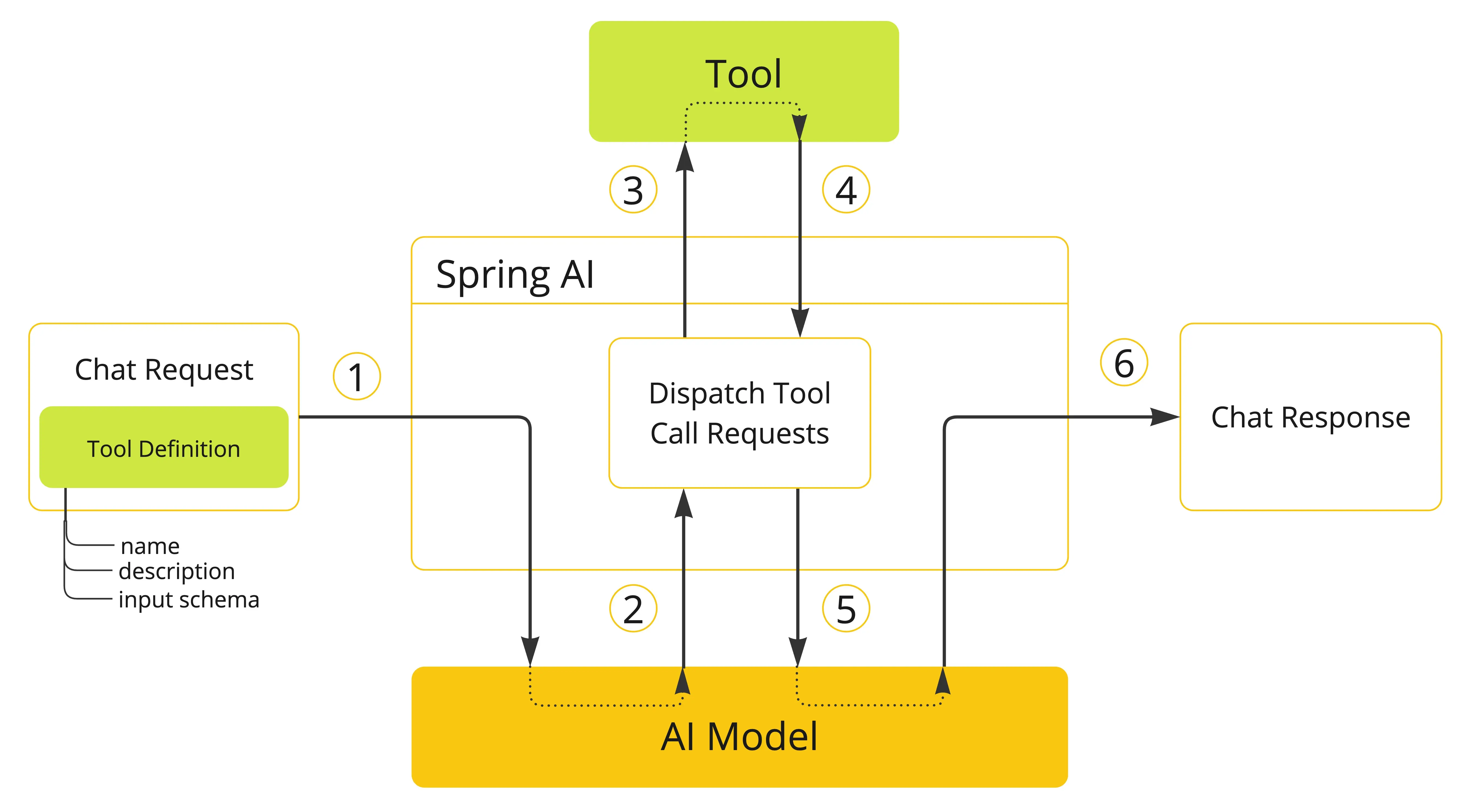
Spring AI工具调用流程

工具调用流程如下:

  1. 在向大模型发起请求时,将工具信息传递给大模型
    • 每个工具的定义都包含名称、描述、输入参数
  2. 大模型根据工具信息,会发送包含工具名称、亲求参数的请求给工具服务
  3. 应用程序根据工具名称,识别到对应的工具,调用工具方法
  4. 工具执行结果返回给应用程序进行处理(可能是直接返回给用户,也可能是返回给大模型)
  5. 应用程序将工具执行结果返回给大模型
  6. 大模型利用工具返回的结果,构建返回结果给用户

2. SpringAI关键实现

SpringAI主要提供了两种内置方式将本地方法封装成工具

  • 声明式:通过注解 @Tool
  • 编程式:通过底层的 MethodToolCallback FunctionToolCallback

https://java2ai.com/docs/dev/tutorials/function-calling/

上图中橙色的部分,就是SpringAI将我们本地方法封装成工具,供大模型进行交互;接下来我们看一下SpringAI的关键类

a. ToolCallback

ToolCallback 接口提供了定义 AI 模型可调用工具的方式,包含工具定义和执行逻辑。

1
2
3
4
5
6
7
8
9
10
11
12
13
14
15
16
17
public interface ToolCallback {
ToolDefinition getToolDefinition();

default ToolMetadata getToolMetadata() {
return ToolMetadata.builder().build();
}

String call(String toolInput);

default String call(String toolInput, @Nullable ToolContext tooContext) {
if (tooContext != null && !tooContext.getContext().isEmpty()) {
throw new UnsupportedOperationException("Tool context is not supported!");
} else {
return this.call(toolInput);
}
}
}

SpringAI提供了两种内置实现

  • MethodToolCallback: 将本地方法定义为AI模型可调用的工具
  • FunctionToolCallback: 将函数定义为AI模型可调用的工具

b. ToolDefinition

ToolDefinition 接口提供 AI 模型识别工具可用性所需的信息,包括工具名称、描述及输入模式。每个 ToolCallback 实现必须提供 ToolDefinition 实例来定义工具。

1
2
3
4
5
6
7
8
9
10
11
12
13
14
15
16
17
public interface ToolDefinition {

/**
* 工具名
*/
String name();

/**
* 工具说明,告诉AI这个工具可以干嘛
*/
String description();

/**
* 传参方式,通常是 json schema格式
*/
String inputSchema();
}

若需要手动创建的工具定义,可以使用ToolDefinition.Builder

1
2
3
4
5
6
7
8
9
10
11
12
13
14
15
16
17
18
19
ToolDefinition toolDefinition = ToolDefinition.builder()
.name("currentWeather")
.description("Get the weather in location")
.inputSchema("""
{
"type": "object",
"properties": {
"location": {
"type": "string"
},
"unit": {
"type": "string",
"enum": ["C", "F"]
}
},
"required": ["location", "unit"]
}
""")
.build();

除了上面的方式,对于本地java方法,可以直接通过反射的方式来生成基于方法的工具定义

1
2
3
4
5
6
7
8
9
Method method = ReflectionUtils.findMethod(DateTimeTools.class, "getCurrentDateTime");
ToolDefinition toolDefinition = ToolDefinition.from(method);

// 如果需要显示修改某些属性,可以如下
ToolDefinition toolDefinition = ToolDefinition.builder(method)
.name("currentDateTime")
.description("Get the current date and time in the user's timezone")
.inputSchema(JsonSchemaGenerator.generateForMethodInput(method))
.build();

c. JSON Schema

向 AI 模型提供工具时,模型需要知道工具调用输入类型的模式,Spring AI 通过 JsonSchemaGenerator 类内置支持生成工具输入类型的 JSON Schema

下面是一个json schema的示例(在前面结构化返回中,实际上也用到了 JSON Schema,用于告知大模型如何返回我们希望格式的数据)

1
2
3
4
5
6
7
8
9
10
11
12
13
{
"type": "object",
"properties": {
"location": {
"type": "string"
},
"unit": {
"type": "string",
"enum": ["C", "F"]
}
},
"required": ["location", "unit"]
}

这里的json schema主要用于方法/函数调用的传参定义,SpringAI内置支持下面四种基于注解升成输入参数描述、是否必传

  • Spring AI@ToolParam(description = "…", required=false): 参数描述 + 是否必传
  • Jackson@JsonClassDescription(description = "…): 参数描述
  • Jackson@JsonPropertyDescription(description = "…") : 参数描述
  • Jackson@JsonProperty(required = false) : 参数是否必传
  • Swagger@Schema(description = "…", required = false) : 参数描述 + 是否必传
  • Spring@Nullable : 参数是否必传

示例:

1
2
3
4
5
6
7
class DateTimeTools {
@Tool(description = "Set a user alarm for the given time")
void setAlarm(@ToolParam(description = "Time in ISO-8601 format", required = true) String time) {
LocalDateTime alarmTime = LocalDateTime.parse(time, DateTimeFormatter.ISO_DATE_TIME);
System.out.println("Alarm set for " + alarmTime);
}
}

d. 结果转换

通常方法/函数返回的是Object对象,需要转换给大模型使用,SpringAI定义ToolCallResultConverter对返回进行序列化,实现将返回结果转换为String对象

1
2
3
4
5
6
7
8
9
10
@FunctionalInterface
public interface ToolCallResultConverter {

/**
* Given an Object returned by a tool, convert it to a String compatible with the
* given class type.
*/
String convert(@Nullable Object result, @Nullable Type returnType);

}

SpringAI默认的结果转换为基于Jackson的json序列化(DefaultToolCallResultConverter),当然如果你喜欢,也可以换成gson、fastjson或者自定义的转换实现

e. ToolContext

Spring AI 支持通过 ToolContext API向工具传递额外的上下文信息,ToolContext 中的数据由用户调用 ChatClient 时提供。后面的使用示例会进行案例介绍

1
2
3
4
5
6
7
8
9
10
11
12
13
14
15
16
public final class ToolContext {
public static final String TOOL_CALL_HISTORY = "TOOL_CALL_HISTORY";
private final Map<String, Object> context;

public ToolContext(Map<String, Object> context) {
this.context = Collections.unmodifiableMap(context);
}

public Map<String, Object> getContext() {
return this.context;
}

public List<Message> getToolCallHistory() {
return (List)this.context.get("TOOL_CALL_HISTORY");
}
}

ToolContext的实现也非常简单,一个不可变对象Map来承接工具调用上下文数据

二、使用示例

1. 项目创建

项目创建方式与之前并无差别,创建一个SpringBoot项目,并引入SpringAI的依赖,有需要的小伙伴参考 创建一个SpringAI-Demo工程

在pom中添加相关依赖

1
2
3
4
5
6
7
8
9
10
<dependencies>
<dependency>
<groupId>org.springframework.boot</groupId>
<artifactId>spring-boot-starter-web</artifactId>
</dependency>
<dependency>
<groupId>org.springframework.ai</groupId>
<artifactId>spring-ai-starter-model-zhipuai</artifactId>
</dependency>
</dependencies>

我们这里使用智谱的免费大模型,虽然免费但它依然支持工具调用(请注意,并不是所有的模型都支持工具调用的,在使用之前到官方的说明确认是否支持)

2. 声明式使用方式

我们定义一个简单、基础可用的工具方法,主要用于获取当前时间,核心点就是在方法上添加注解 @Tool

  • 注解的 description 属性非常重要,用于知道模型判断何时调用这个工具;当描述不够清晰时,可能导致模型在该调用工具时没有调用,或者调用错了工具
1
2
3
4
5
6
7
8
9
10
class DateTimeTools {

// 获取当前时间,工具描述,使用中文也是可以的
@Tool(description = "Get the current date and time in the user's timezone")
String getCurrentDateTime() {
String ans = LocalDateTime.now().atZone(LocaleContextHolder.getTimeZone().toZoneId()).toString();
System.out.println("进入获取当前时间了:" + ans);
return ans;
}
}

对于使用 ChatClient 来使用工具调用,就非常简单了,如

1
2
3
4
5
6
7
8
9
10
11
12
13
14
15
16
17
18
19
20
@RestController
public class ChatController {

private final ChatClient chatClient;

public ChatController(ZhiPuAiChatModel chatModel) {
this.chatClient = ChatClient.builder(chatModel)
.build();
}

@RequestMapping(path = "time")
public String getTime(String msg) {
return chatClient.prompt(msg).tools(new DateTimeTools()).call().content();
}

@RequestMapping(path = "timeNoTools")
public String getTimeNoTools(String msg) {
return chatClient.prompt(msg).call().content();
}
}

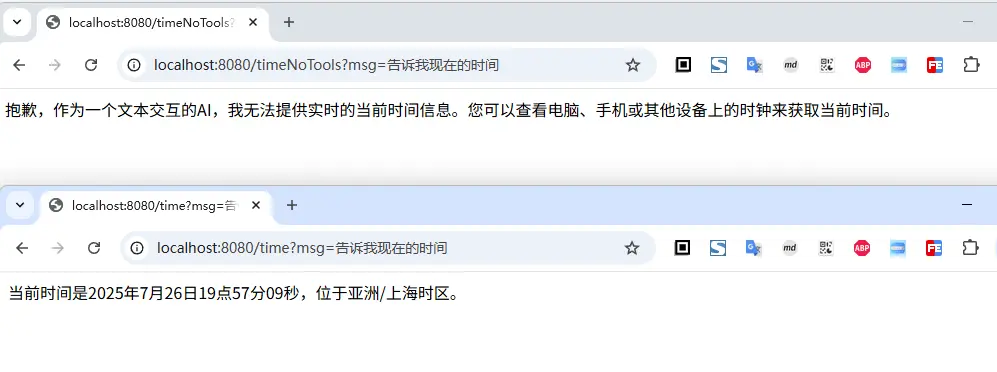
上面有提供了两个接口, getTime 接口使用了工具,getTimeNoTools 接口没有使用工具;使用方式形如

  • chatClient.prompt().tools(xxx):通过tools方法注入工具

接下来我们看一下表现情况

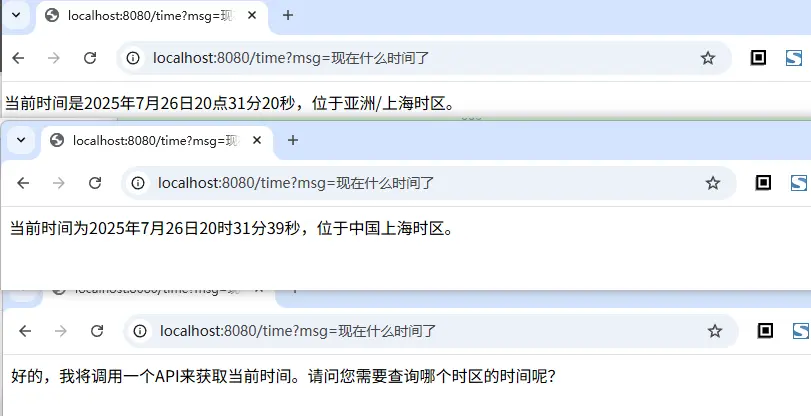
说明:虽然上面的访问对比中,在请求 time 接口时,正确的返回了时间,但是大模型并不总是和我们预期的一致,同样的提问,它有时不会主动调用我们注入的工具

3. 带参数的工具方法

前面定义的工具没有参数,接下来我们在看一下带参数的工具方法

在方法参数上,可以通过 @ToolParam 注解对参数进行解释说明(这个注解是非必填的),注解内有两个属性

  • description:参数描述,用于帮助模型更准确地理解如何使用该参数。例如:参数格式要求、允许取值范围等。
  • required:指定参数是否为必需项(默认值:true,即所有参数默认必需)。

比如我现在定义一个返回不同时区的当前时间的工具,供大模型调用,参数是时区,同样放在 DateTimeTools 类中,这样就可以直接使用上面的api

1
2
3
4
5
6
7
8
9
10
11
12
13
14
15
class DateTimeTools {
@Tool(description = "传入时区,返回对应时区的当前时间给用户")
String getTimeByZoneId(@ToolParam(description = "需要查询时间的时区") ZoneId area) {
// 根据时区,查询对应的时间
ZonedDateTime time = LocalDateTime.now().atZone(area);

// 转换为 2025-07-26 20:00:00 格式的字符串
// 将输入时区的时间转换为本地时区
ZonedDateTime localTime = time.withZoneSameInstant(ZoneId.systemDefault());
DateTimeFormatter formatter = DateTimeFormatter.ofPattern("yyyy-MM-dd HH:mm:ss");
String ans = localTime.format(formatter);
System.out.println("传入的时区是:" + area + "-" + ans);
return ans;
}
}

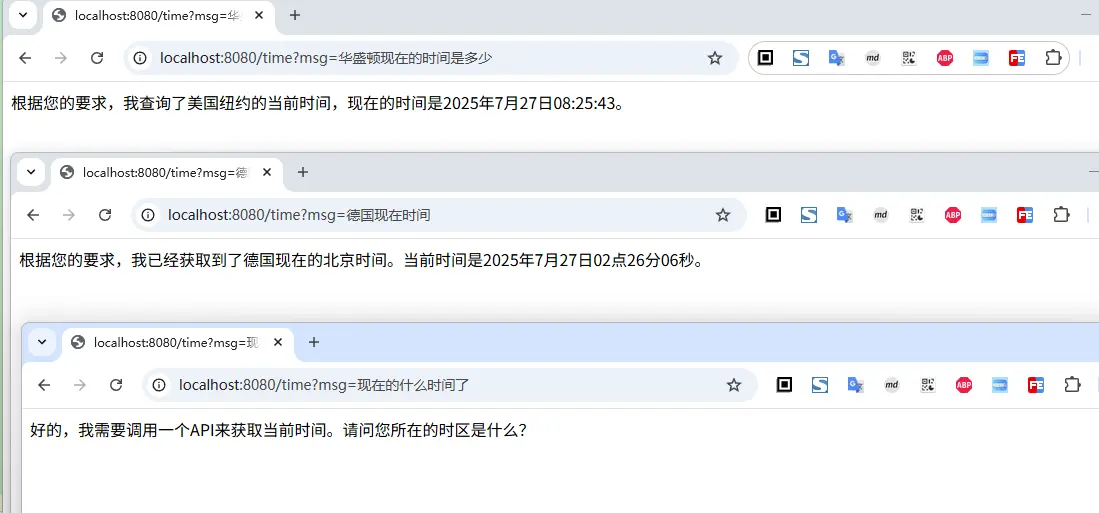
从上面的访问示例也可以看出,我们询问某个地区的时间时,大模型会自动根据地区找到时区,然后调用我们的工具返回结果

但是一个问题来了,直接问时间时,它不会调用我们之前定义的那个方法,返回时间,这是为什么呢?

我们尝试调整一下,之前定义获取当前时间的工具方法说明

1
2
3
4
5
6
@Tool(description = "不需要关注用户时区,直接返回当前的时间给用户")
String getCurrentDateTime() {
String ans = LocalDateTime.now().atZone(LocaleContextHolder.getTimeZone().toZoneId()).toString();
System.out.println("进入获取当前时间了:" + ans);
return ans;
}

然后再多问几次,你就会发现大模型会主动调用我们定义的这个方法,返回时间(但是并不能始终保证它总是表现正确)

  • 所以一个何时的、精确的工具描述,对于大模型的决策是否调用,非常重要

4. 添加默认工具

上面介绍的是在用户发起对话时,设置Prompt时指定工具调用,同样的,SpringAI也提供了默认工具的设置方式,在ChatClient创建时,指定默认的工具,这样只要用这个ChatClient进行对话,这些工具都会提供给大模型,而不在需要单独进行设置

使用方式形如

1
2
3
ChatClient chatClient = ChatClient.builder(chatModel)
.defaultTools(new DateTimeTools())
.build();

这个就不做具体的演示了,没有什么特殊的地方

5. ChatModel 添加工具

如果某些场景下,我们不是通过ChatClent而是直接借助ChatModel进行对话,同样也可以添加工具,通过 ChatOptions 来实现

具体的使用姿势如下,借助ToolCallbacks来获取工具集,借助ToolCallingChatOptions来添加工具集

1
2
3
4
5
6
7
8
@RequestMapping(path = "showTime")
public String showTime(String msg) {
ToolCallback[] tools = ToolCallbacks.from(new DateTimeTools());
ChatOptions options = ToolCallingChatOptions.builder()
.toolCallbacks(tools)
.build();
return chatModel.call(new Prompt(msg, options)).getResult().getOutput().getText();
}

6. 编程式使用方式

前面介绍的都是基于@Tool注解的声明式定义工具,这种适用于工具实现完全由我们掌控的场景;对于一些非控制的工具实现(如三方sdk),或者需要动态获取工具参数的场景,我们可以使用编程式定义工具

编程式的使用方式,主要是借助MethodToolCallback.Builder来构建我们需要的MethodToolCallback

使用这种方式时,需要重点看一下前面第一节的内容,ToolCallback ToolDefinition的类结构定义,清楚之后,再看下面的参数设置就会更轻轻松(也知道为什么要这么实现)

  • toolDefinition:定义工具名称、描述及输入模式的 ToolDefinition 实例(必需项)
    • 可通过 ToolDefinition.Builder 类构建。
  • toolMetadata: 定义额外设置的 ToolMetadata 实例,非必需
    • 可通过 ToolMetadata.Builder 类构建
    • returnDierect: 是否直接返回结果(默认为false`),为true时表示直接将结果返回给用户、而不是给大模型进行调用
  • toolMethod: 工具方法的Method实例 (必需项)
  • toolObject: 包含工具方法的对象实例(若方法为静态方法则可省略此参数)
  • toolCallResultConverter:用于将工具调用结果转换为 String 对象并返回 AI 模型
    • ToolCallResultConverter 实例(未配置时默认使用 DefaultToolCallResultConverter)。
1
2
3
4
5
6
7
8
9
10
11
12
13
14
15
16
17
18
19
20
21
22
@RequestMapping(path = "timeByCodeTool")
public String getTimeByCodeTool(String msg) {
Method method = ReflectionUtils.findMethod(DateTimeTools.class, "getTimeByZoneId", ZoneId.class);

ToolDefinition toolDefinition = ToolDefinition.builder()
.name("getTimeByZoneId")
.description("传入时区,返回对应时区的当前时间给用户")
.inputSchema(JsonSchemaGenerator.generateForMethodInput(method))
.build();

ToolMetadata toolMetadata = ToolMetadata.builder()
.returnDirect(false)
.build();

ToolCallback callBack = MethodToolCallback.builder()
.toolDefinition(toolDefinition)
.toolMetadata(toolMetadata)
.toolMethod(method)
.toolObject(new DateTimeTools())
.build();
return chatClient.prompt(msg).toolCallbacks(callBack).call().content();
}

在使用方法工具时,需要注意一些限制

以下类型目前不支持作为工具方法的参数或返回类型:

  • Optional
  • 异步类型(如 CompletableFuture、Future)
  • 响应式类型 (如 Flow、Mono、Flux)
  • 函数式类型(如 Function、Supplier、Consumer)

7. 函数作为工具调用的使用示例

到现在为止,我们都是将方法作为工具给大模型进行调用,在java8+之后,除了方法还有些函数式接口,比如FunctionConsumerSupplierPredicate等,这些函数式接口也可以作为工具进行调用,使用方式如下:

通过 FunctionToolcallback 来将函数式类型,转换为工具

1
2
3
4
5
6
7
8
9
10
11
12
13
14
15
16
17
18
19
20
21
22
23
24
25
26
27
28
29
30
31
32
33
34
35
class NowService implements Function<AreaReq, AreaResp> {
@Override
public AreaResp apply(AreaReq req) {
ZoneId area = req.zoneId();
// 根据时区,查询对应的时间
ZonedDateTime time = LocalDateTime.now().atZone(area);

// 转换为 2025-07-26 20:00:00 格式的字符串
// 将输入时区的时间转换为本地时区
ZonedDateTime localTime = time.withZoneSameInstant(ZoneId.systemDefault());
DateTimeFormatter formatter = DateTimeFormatter.ofPattern("yyyy-MM-dd HH:mm:ss");
String ans = localTime.format(formatter);
System.out.println("传入的时区是:" + area + "-" + ans);
return new AreaResp(ans);
}
}

record AreaReq(@ToolParam(description = "需要查询时间的时区") ZoneId zoneId) {
}

record AreaResp(String time) {
}

@RequestMapping(path = "timeByCodeFunc")
public String getTimeByCodeFunc(String msg) {
// 使用函数式工具需要注意的是,传参和返回结果,要么是void,要么是POJO
ToolCallback callBack = FunctionToolCallback.builder("nowDateByArea", new NowService())
.description("传入时区,返回对应时区的当前时间给用户")
.inputType(AreaReq.class)
// 下面这一行实际是可以省略的,默认就是根据 inputType 进行生成jsonSchema
.inputSchema(JsonSchemaGenerator.generateForType(AreaReq.class))
.toolMetadata(ToolMetadata.builder().returnDirect(false).build())
.build();
return chatClient.prompt(msg).toolCallbacks(callBack).call().content();
}

具体的使用方式,和上面介绍的方法的编程式相差不大,但是有一个需要格外注意的事项

  • 函数输入和输出可以是 Void 或 POJO。输入和输出的 POJO 必须是可序列化的,因为结果将被序列化并发送回模型。
  • 函数及输入输出类型必须是 public 的。

以下类型目前不支持作为工具函数的输入或输出类型:

  • 基本类型
  • Optional
  • 集合类型 (如 List、Map、Array、Set)
  • 异步类型(如 CompletableFuture、Future)
  • 响应式类型(如 Flow、Mono、Flux)

8. 动态范式 @Bean

这种类似于声明式的函数工具,Spring AI 通过 ToolCallbackResolver 接口(SpringBeanToolCallbackResolver具体实现),在运行时动态解析

可以将任意 FunctionSupplierConsumerBiFunction 类型的 Bean 作为工具使用。

  • Bean 名称将作为工具名称`
  • Spring Framework@Description 注解提供工具描述

实测,没有成功,待后续确认这个逻辑是否和官网说的一致

三、小结

本篇文章主要介绍了SpringAI如何定义、使用工具调用,包括方法工具/函数工具两类,有基于@Tool注解的声明式,也有借助 MethodToolCallbackFunctionToolCallback 实现的编程式
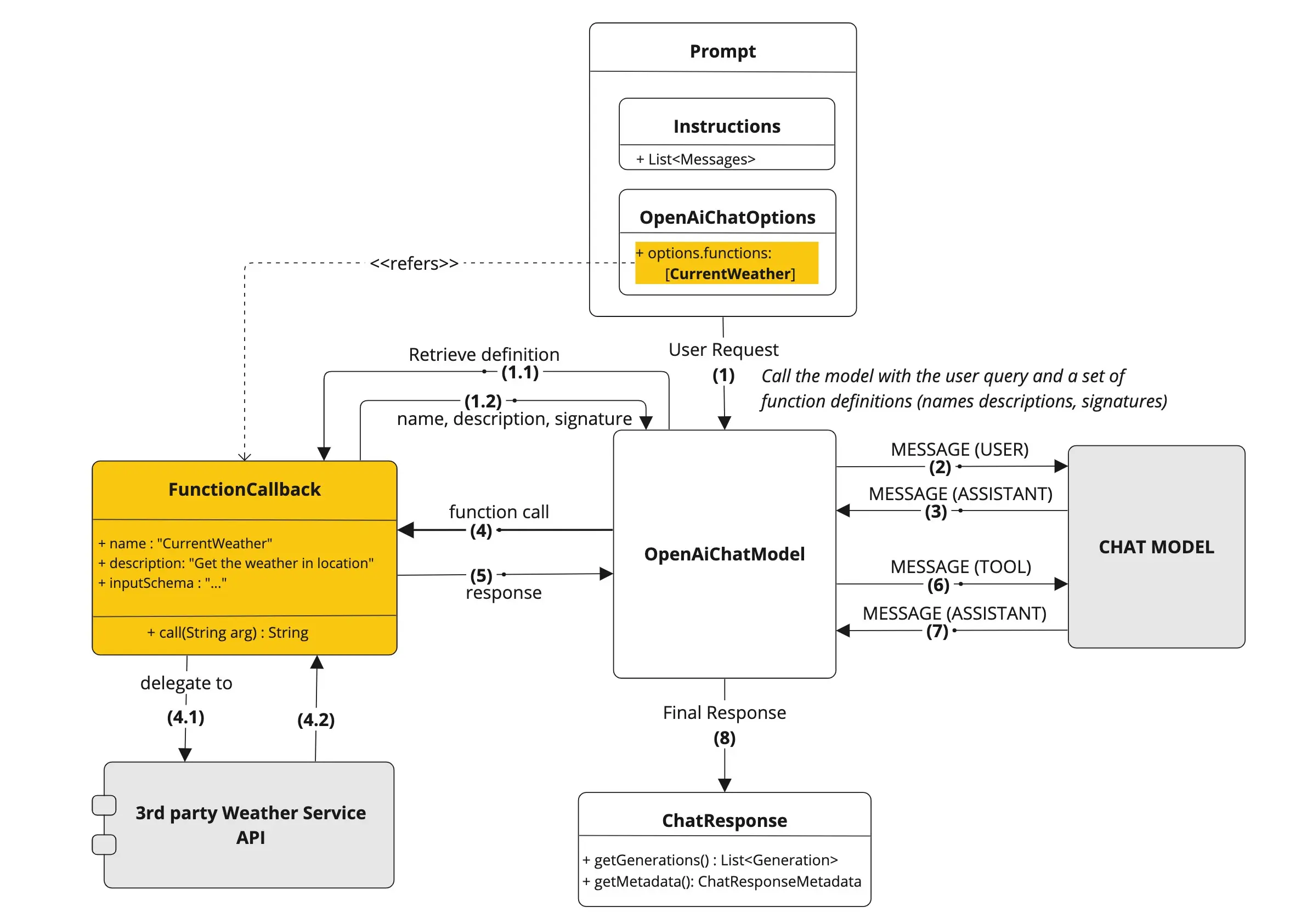
在工具的定义上,我们需要额外关注工具的描述,传参和返回;其中传参是通过 Json Schema 的形式给到的大模型

默认行为时,Spring AI 会自动拦截模型的工具调用请求,执行工具并将结果返回模型。这些操作均由各 ChatModel 实现通过 ToolCallingManager 透明完成,如下图
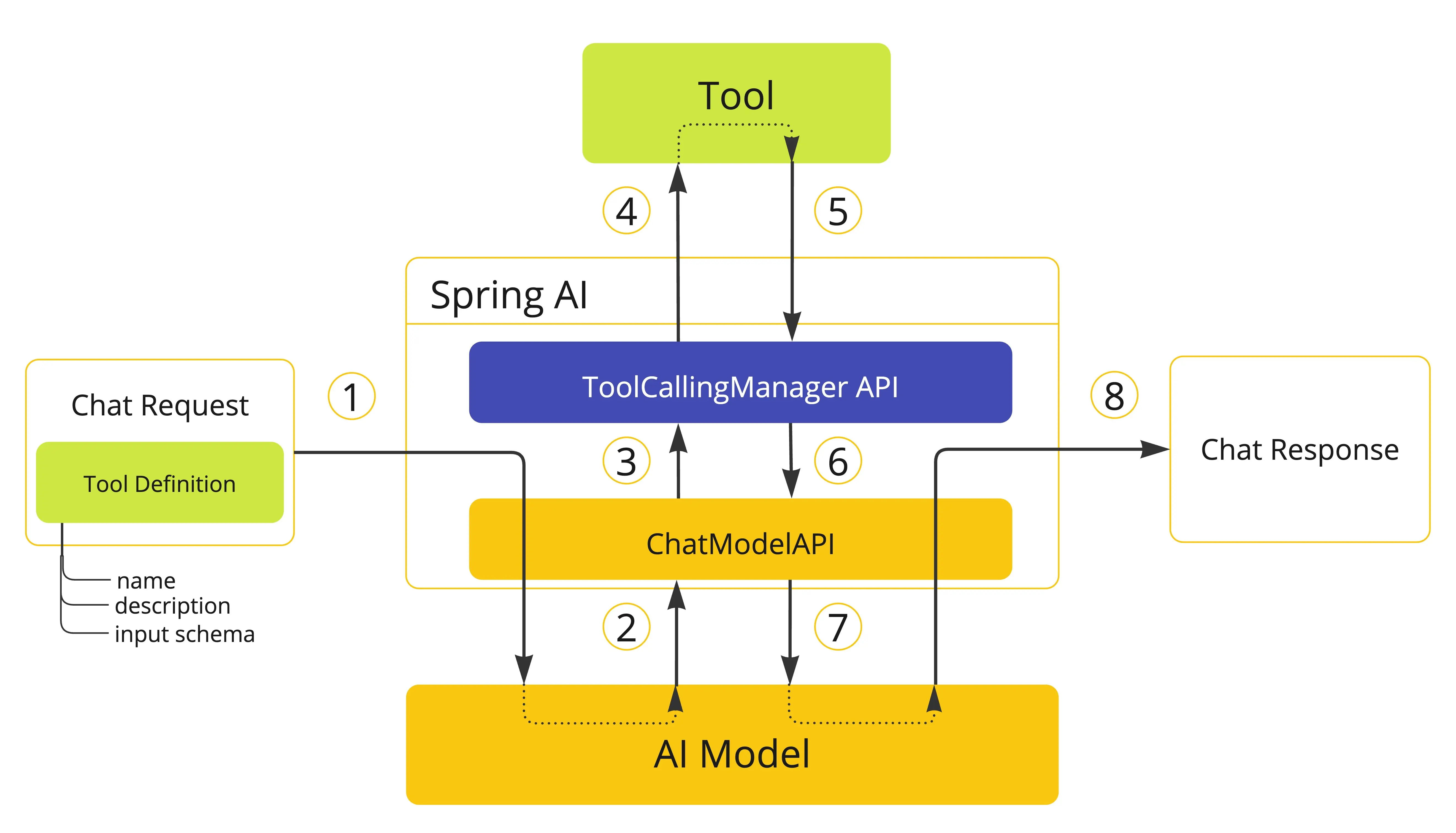
  1. 当需要向模型提供工具时,我们将其定义包含在聊天请求(Prompt)中,并调用 ChatModel API 将请求发送至 AI 模型。
  2. 当模型决定调用工具时,它会发送包含工具名称及符合定义模式的输入参数的响应(ChatResponse)。
  3. ChatModel 将工具调用请求发送至 ToolCallingManager API。
  4. ToolCallingManager 负责识别需调用的工具并使用提供的输入参数执行该工具。
  5. 工具调用结果返回至 ToolCallingManager。
  6. ToolCallingManager 将工具执行结果返回给 ChatModel。
  7. ChatModel 将工具执行结果返回AI模型(ToolResponseMessage)。
  8. AI 模型利用工具调用结果作为附加上下文生成最终响应,并通过 ChatClient 将其返回调用方(ChatResponse)。

目前与模型交互的工具执行,是由SpringAI托管的,内部的工具选择等逻辑对用户是不透明的,当然也可以通过将 ToolCallingChatOptionsinternalToolExecutionEnabled 属性设为 false,来实现自行控制工具执行的生命周期;这块的内容,将在下一章节进行介绍

文中所有涉及到的代码,可以到项目中获取 https://github.com/liuyueyi/spring-ai-demo

微信公众号: 一灰灰Blog

尽信书则不如,以上内容,纯属一家之言,因个人能力有限,难免有疏漏和错误之处,如发现bug或者有更好的建议,欢迎批评指正,不吝感激

下面一灰灰的个人博客,记录所有学习和工作中的博文,欢迎大家前去逛逛

一灰灰blog


打赏 如果觉得我的文章对您有帮助,请随意打赏。
分享到