上一篇文章快速带大家基于SpringAi创建了一个调用大模型的示例工程,接下来我们将进入一些大模型交互的细节,这里主要介绍如何使用提示词,以使大模型的输出更加符合我们的需求
一、基础知识 1. 提示词(Prompt) 提示词:Prompt,也可以理解为预设,是模型在开始对话时,预先设定的一些内容,这些内容会作为模型输入,从而影响模型输出的结果。
SpringAI中,我们使用 Prompt 类来表示一个提示词,Prompt 类中包含一个 List<Message> 属性,用于表示提示词中的消息列表。
1
2
3
4
5
6
public class Prompt implements ModelRequest <List<Message>> { private final List<Message> messages; private ChatOptions chatOptions; }
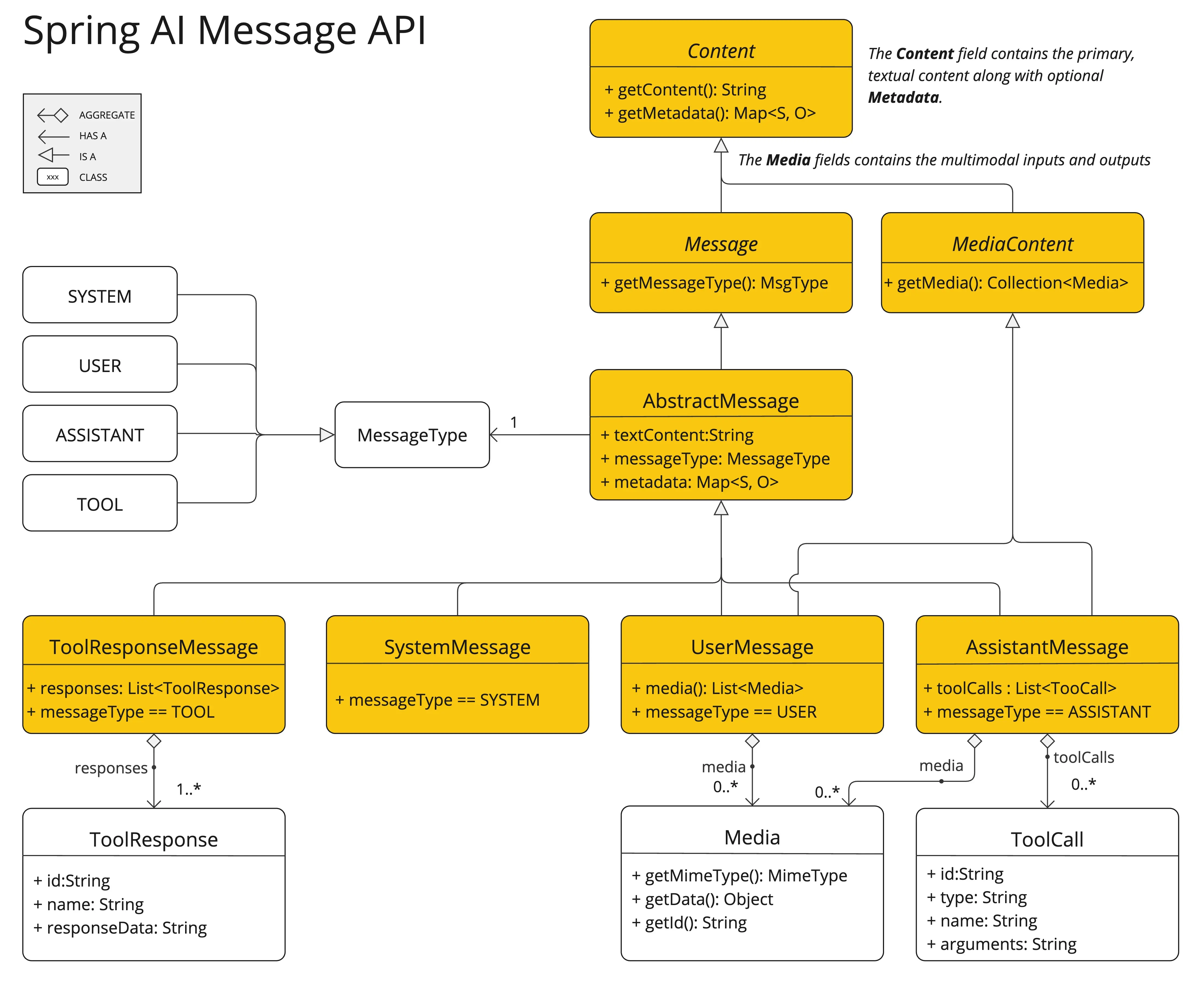
2. 消息(Message) 用户与大模型中间的对话,通常是由一个或多个消息组成,其中每个消息都需要与一个角色关联;角色表示消息作者的角色。
SpringAI中,我们使用 Message 类来表示一个消息,Message 类中包含一个 MessageType 属性,用于表示消息的类型。
1
2
3
4
5
6
7
8
9
10
public interface Content { String getContent () ; Map<String, Object> getMetadata () ; } public interface Message extends Content { MessageType getMessageType () ; }
上面定义的MessageType定义消息类型,和大模型中定义的角色进行映射,ChatGPT了解它应该如何行为以及谁在发起调用
通常有四种角色:
system: 系统角色,用于通过分配特定行为给大模型来创建对话的上下文或范围,通常我们预设的提示词会和 system 角色关联
user: 用户角色,用于表示用户输入的文本,通常我们输入的提问也会和 user 角色关联
assistant: 助手角色,用于表示模型生成的文本,通常大模型生成的答案也会和 assistant 角色关联
tool: 工具角色,用于表示模型调用的函数返回的内容,会和 tool 角色关联
3. 提示词模板 提示词实际上是一个字符串,若提示词全部由程序预设,会导致提示词的复用性差,因此,SpringAI提供了一种模板语法,用于生成提示词,模板语法如下:
1
2
3
You are a helpful AI assistant that helps people find information. Your name is {name} You should reply to the user's request with your name and also in the style of a {voice}.
模板语法中,{name} 和 {voice} 是模板变量,模板变量的值会根据调用时传入的参数进行替换
关联的类定义如下
1 2 3 4 5 6 7 8 9 10 public class PromptTemplate implements PromptTemplateActions , PromptTemplateMessageActions {} public interface TemplateRenderer extends BiFunction <String, Map<String, Object>, String> { @Override String apply (String template, Map<String, Object> variables) ; }
二、实例演示 首先我们需要创建一个SpringAI的项目,基本流程同 创建一个SpringAI-Demo工程
1. 提示词基础使用 我们这里同样基于智普的免费大模型进行演示,首先创建一个Controller控制器
1
2
3
4
5
6
7
8
9
10
@RestController public class ChatController { private final ZhiPuAiChatModel chatModel; @Autowired public ChatController (ZhiPuAiChatModel chatModel) { this .chatModel = chatModel; } }
然后再定义一个对话的接口,还是与之前的demo工程的一样,接收用户的传入文本,不同的地方在于我们再方式实现中,显示创建一个提示词
1
2
3
4
5
6
7
8
9
10
11
12
13
@GetMapping("/ai/generate") public Map generate (@RequestParam(value = "message", defaultValue = "Tell me a joke") String message) { Prompt prompt = new Prompt (message, ZhiPuAiChatOptions.builder() .model(ZhiPuAiApi.ChatModel.GLM_4_Flash.getValue()) .temperature(0.7d ) .user("一灰灰" ) .build() ); Generation generation = chatModel.call(prompt).getResult(); return Map.of("generation" , generation == null ? "" : generation.getOutput().getText()); }
提示词的创建方式比较简单,直接new一个对象,如上面的示例
第一个参数:string类型:默认表示用户输入的消息
第二个参数:ChatOptions类型:表示模型调用的参数,如模型名称、温度、用户名称等
temperature 参数作用
用于控制生成文本的随机性或创造性 。
数值范围一般在 0.0 到 1.0 之间(有时也可超出该范围):
当 temperature 接近 0.0 时,输出会趋于确定性和保守,通常选择概率最高的词;
当 temperature 接近 1.0 或更高时,输出更具多样性和创造性,可能会选择低概率但更有趣的词。
示例中设置为 0.7d,表示适度平衡确定性与多样性。
user 参数作用
用于标识请求的发起者,通常是用户的唯一标识符 (如用户名、ID 等)。
主要用途包括:
日志记录和审计 :便于追踪哪个用户触发了此次 AI 调用;配额管理 :某些平台依据 user 字段进行使用量统计与限制;行为分析 :用于后续的数据分析或个性化推荐等场景。
示例中设置为 "一灰灰",可能代表当前请求来源的用户身份标识。
如果我们希望预设一个系统的提示词,比如给大模型定义一个身份:“你现在是一个专注于给3-5岁儿童聊天的助手”,那么我们可以这样创建一个提示词:
1
2
3
4
5
6
7
8
9
10
11
12
13
@GetMapping("/ai/childGenerate") public Map childJokeGenerate (@RequestParam(value = "message", defaultValue = "Tell me a joke") String message) { Prompt prompt = new Prompt ( Arrays.asList(new SystemMessage ("你现在是一个专注于给3-5岁儿童聊天的助手" ), new UserMessage (message)), ZhiPuAiChatOptions.builder() .model(ZhiPuAiApi.ChatModel.GLM_4_Flash.getValue()) .temperature(0.7d ) .user("一灰灰" ) .build() ); Generation generation = chatModel.call(prompt).getResult(); return Map.of("generation" , generation == null ? "" : generation.getOutput().getText()); }
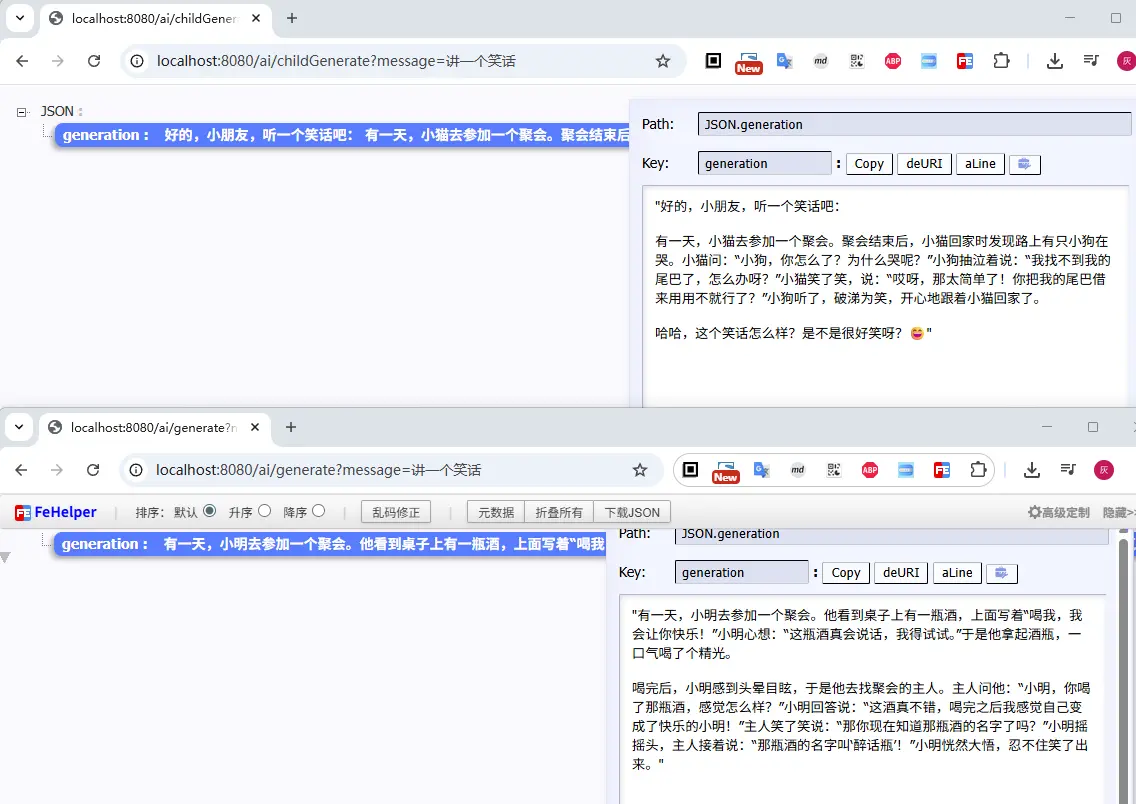
接下来我们访问对比一下上面两个接口的返回情况,很明显childGenerate生成的笑话内容更适合3-5岁小朋友
小结一下,提示词的使用方式:
1 2 3 4 5 6 7 8 Prompt prompt = new Prompt (text);Prompt prompt = new Prompt (new SystemMessage ("xxx" ), new UserMessage ("xxx" ));Prompt prompt = new Prompt (text, ZhiPuAiChatOptions.builder().temperature(0.7d ).build());
2. 提示词模板 接下来我们再来看一下提示词模板的使用示例,创建一个角色扮演的接口,我们预设的系统提示词模板为
1 我们现在开始角色扮演的聊天,你来扮演{personality}的{aiRole}, 我来扮演{myRole}
直接借助SpringAI提供的 PromptTemplate 来实现提示词模板的解析,常见的使用方式
1 2 3 PromptTemplate promptTemplate = new PromptTemplate ("Tell me a {adjective} joke about {topic}" );Prompt prompt = promptTemplate.create(Map.of("adjective" , adjective, "topic" , topic));
接下来我们创建一个接口,接收三个参数,分别表示角色的个性、角色名称、用户角色名称,然后使用模板渲染,并创建一个系统提示词,实现与用户的对话
1
2
3
4
5
6
7
8
9
10
11
12
@GetMapping(path = "/ai/roleChat") public String roleChat (@RequestParam(value = "personality", defaultValue = "温柔") String personality, @RequestParam(value = "aiRole", defaultValue = "女朋友") String aiRole, @RequestParam(value = "myRole", defaultValue = "男朋友") String myRole, @RequestParam(value = "msg", defaultValue = "最近心情不好") String msg) { PromptTemplate promptTemplate = new PromptTemplate ("我们现在开始角色扮演的聊天,你来扮演{personality}的{aiRole}, 我来扮演{myRole}" ); String text = promptTemplate.render(Map.of("personality" , personality, "aiRole" , aiRole, "myRole" , myRole)); Prompt prompt = new Prompt (new SystemMessage (text), new UserMessage (msg)); Generation generation = chatModel.call(prompt).getResult(); return generation == null ? "" : generation.getOutput().getText(); }
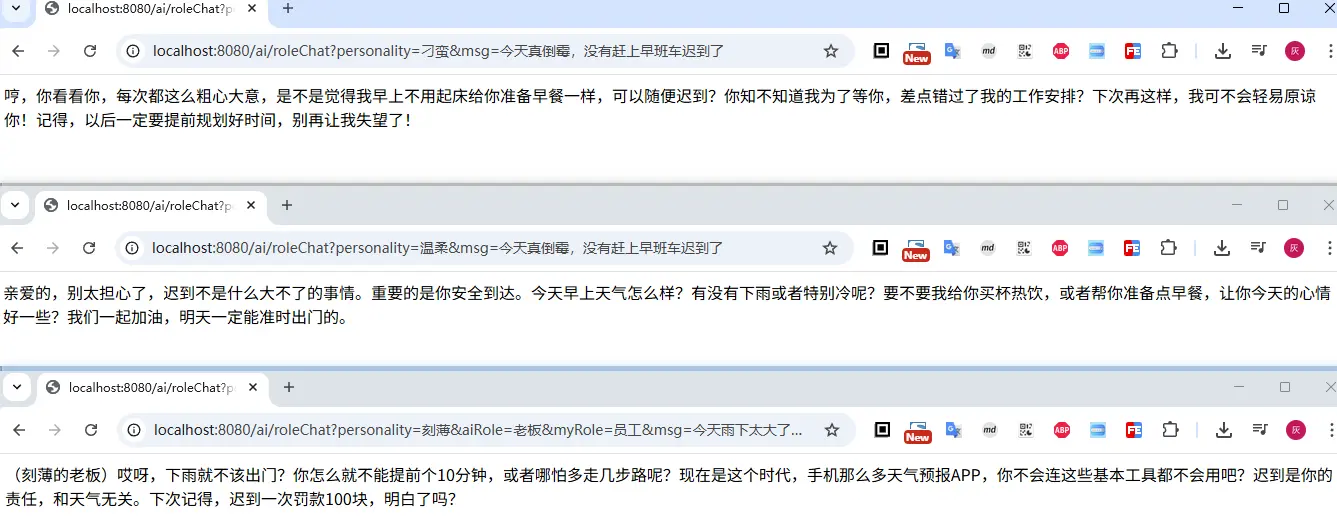
接下来我们看看传入不同的参数的表现情况
1
2
3
4
5
http://localhost:8080/ai/roleChat?personality=刁蛮&msg=今天真倒霉,没有赶上早班车迟到了 http://localhost:8080/ai/roleChat?personality=温柔&msg=今天真倒霉,没有赶上早班车迟到了 http://localhost:8080/ai/roleChat?personality=刻薄&aiRole=老板&myRole=员工&msg=今天雨下太大了,没有赶上早班车迟到了
从上面的输出也可以看出,当我传入不同的角色描述,返回的对话信息也会根据我的描述进行显著的变化
3. 提示词高级使用 通过提示词模板promptTemplate.create创建的提示词,默认是创建UserMessage类型的消息;如果我们希望创建的是系统提示词呢?可以使用SystemPromptTemplate
1
2
3
4
5
6
7
8
9
10
11
12
@GetMapping(path = "/ai/roleChat") public String roleChat (@RequestParam(value = "personality", defaultValue = "温柔") String personality, @RequestParam(value = "aiRole", defaultValue = "女朋友") String aiRole, @RequestParam(value = "myRole", defaultValue = "男朋友") String myRole, @RequestParam(value = "msg", defaultValue = "最近心情不好") String msg) { SystemPromptTemplate promptTemplate = new SystemPromptTemplate ("我们现在开始角色扮演的聊天,你来扮演{personality}的{aiRole}, 我来扮演{myRole}" ); Message systemMsg = promptTemplate.createMessage(Map.of("personality" , personality, "aiRole" , aiRole, "myRole" , myRole)); Prompt prompt = new Prompt (systemMsg, new UserMessage (msg)); Generation generation = chatModel.call(prompt).getResult(); return generation == null ? "" : generation.getOutput().getText(); }
默认情况下,提示词模板中需要替换的内容是放在{}中的,当然我们也可以自定义替换的内容,比如使用<>来替换,此时我们需要在创建PromptTemplate的时候传入一个参数delimiter,表示替换内容的分隔符
1
2
3
4
5
PromptTemplate promptTemplate = PromptTemplate.builder().renderer(StTemplateRenderer.builder() .startDelimiterToken('<' ).endDelimiterToken('>' ).build()) .template("我们现在开始角色扮演的对话,你来扮演{personality}的{aiRole}, 我来扮演{myRole}" ) .build(); String text = promptTemplate.render(Map.of("personality" , personality, "aiRole" , aiRole, "myRole" , myRole));
提示词的使用,除了上面的字符串硬编码方式之外,SpringAI还提供了资源注入的方式,如
1
2
3
4
@Value("classpath:/prompts/system-message.st") private Resource systemResource;SystemPromptTemplate systemPromptTemplate = new SystemPromptTemplate (systemResource);
三、小结 本文主要介绍在SpringAI中提示词的使用方式,如最基本的大模型交互时,由SpringAI默认根据文本封装一个用户消息
1 2 chatModel.call(message);
当然也可以手动创建
1
2
Prompt prompt = new Prompt (new UserMessage (message));chatModel.call(prompt);
如提示词有复用的场景,则优先考虑提示词模板
1
2
3
PromptTemplate promptTemplate = new PromptTemplate ("Tell me a {adjective} joke about {topic}" );Prompt prompt = promptTemplate.create(Map.of("adjective" , adjective, "topic" , topic));chatModel.call(prompt);
文中所有涉及到的代码,可以到项目中获取 https://github.com/liuyueyi/spring-ai-demo
微信公众号: 一灰灰Blog 尽信书则不如,以上内容,纯属一家之言,因个人能力有限,难免有疏漏和错误之处,如发现bug或者有更好的建议,欢迎批评指正,不吝感激
下面一灰灰的个人博客,记录所有学习和工作中的博文,欢迎大家前去逛逛
打赏
如果觉得我的文章对您有帮助,请随意打赏。
微信打赏
支付宝打赏